1
install gh tool
tischrei edited this page 2023-04-05 08:23:41 +00:00
Installation of gh (GitHub) CLI tool
This tools is used to interact with GitHub via CLI to e.g. create PullRequests.
Prerequisits
- ssh public-key for GitHub
- Personal Access Token (classic)
- Link: GitHub -> Developer Settings -> Personal Access Tokens -> Tokens (classic)
- Permissions:
admin:public_key, read:org, repo
Installation of gh Tool on Debian / Ubuntu and co.
Use the following bash snippet to get gh tool installed on your machine.
type -p curl >/dev/null || (sudo apt update && sudo apt install curl -y)
curl -fsSL https://cli.github.com/packages/githubcli-archive-keyring.gpg | sudo dd of=/usr/share/keyrings/githubcli-archive-keyring.gpg \
&& sudo chmod go+r /usr/share/keyrings/githubcli-archive-keyring.gpg \
&& echo "deb [arch=$(dpkg --print-architecture) signed-by=/usr/share/keyrings/githubcli-archive-keyring.gpg] https://cli.github.com/packages stable main" | sudo tee /etc/apt/sources.list.d/github-cli.list > /dev/null \
&& sudo apt update \
&& sudo apt install gh -y
Authentication with gh tool
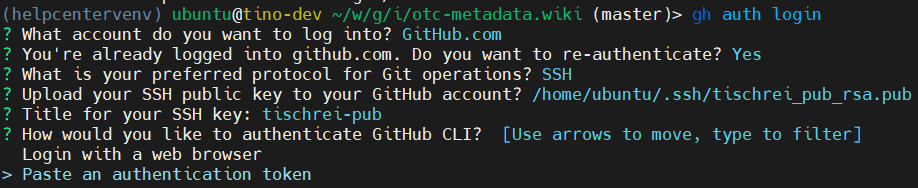
Run the following command to authenticate against Github
gh auth loginFill in the following information and paste the Token.
The tool gives access to your GitHub account.