forked from docs/doc-exports
 wanghuijuan738
8f01f116a5
wanghuijuan738
8f01f116a5
Reviewed-by: Pristromskaia, Margarita <margarita.pristromskaia@t-systems.com>
Co-authored-by: wanghuijuan738 <wanghuijuan738@huawei.com>
Co-committed-by: wanghuijuan738 <wanghuijuan738@huawei.com>
4.0 KiB
4.0 KiB
Changing a Security Group
Scenarios
To change the security group associated with an ECS network interface, perform the operations described in this section.
Constraints
- Changing the security group will overwrite the original security group settings.
- Using multiple security groups may deteriorate ECS network performance. You are advised to select no more than five security groups.
Procedure
- Log in to the management console.
- Click
 in the upper left corner and select a region and project.
 - Under Computing, click Elastic Cloud Server.
- In the ECS list, choose More > Manage Network > Change Security Group in the Operation column.
The Change Security Group panel slides out.
Figure 1 Change Security Group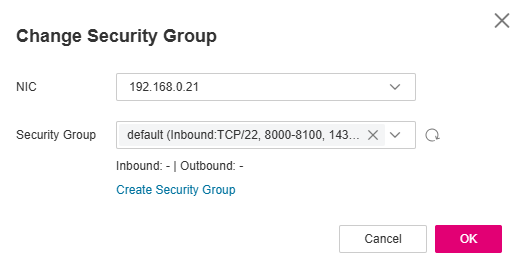
- Select the target NIC and security groups.
You can select multiple security groups. In such a case, the rules of all the selected security groups will apply to the ECS.
To create a security group, click Create Security Group.

Using multiple security groups may deteriorate ECS network performance. You are advised to select no more than five security groups.
- Click OK.


Parent topic: Security Groups