forked from docs/doc-exports
 fanqinying
a2e28c7623
fanqinying
a2e28c7623
Reviewed-by: Hajba, László Antal <laszlo-antal.hajba@t-systems.com>
Co-authored-by: fanqinying <fanqinying@huawei.com>
Co-committed-by: fanqinying <fanqinying@huawei.com>
2.4 KiB
2.4 KiB
Viewing Details of an Enterprise Switch
Scenarios
This section describes how to view basic information about an enterprise switch.
Procedure
- Log in to the management console.
- Click
 in the upper left corner and select the desired region and project.
 - Click
 in the upper left corner of the page to open the service list and choose Network > Enterprise Switch.
The Enterprise Switch page is displayed.
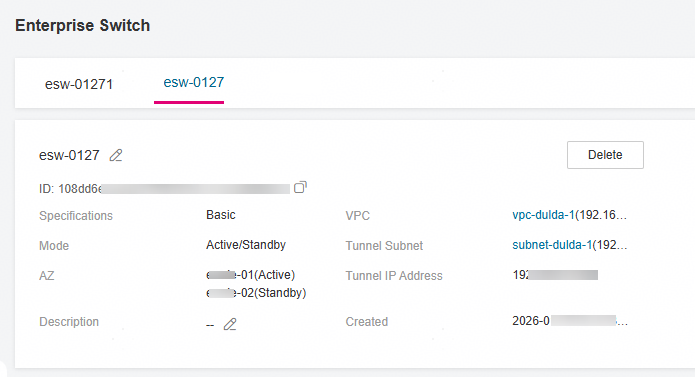
- Click the name of the target enterprise switch.
You can view the basic information about the enterprise switch.


Figure 1 Basic information about the enterprise switch

Parent topic: Enterprise Switches